New Softwares And tools

System tools ,Internet Tools haking tools Web Design tools and More.........

Hacking tips and tricks

Hacking, windows, facebook and computer tricks. Learn to do cool tricks with your ....

This is default featured slide 3 title

Go to Blogger edit html and find these sentences.Now replace these sentences with your own descriptions.This theme is Bloggerized by Lasantha Bandara - Premiumbloggertemplates.com.

This is default featured slide 4 title

Go to Blogger edit html and find these sentences.Now replace these sentences with your own descriptions.This theme is Bloggerized by Lasantha Bandara - Premiumbloggertemplates.com.

This is default featured slide 5 title

Go to Blogger edit html and find these sentences.Now replace these sentences with your own descriptions.This theme is Bloggerized by Lasantha Bandara - Premiumbloggertemplates.com.

Showing posts with label Facebook. Show all posts

Saturday, February 23, 2013

Way to insert poll questions in facebook ..!


Facebook has introduced official tool for asking poll questions on your profile. Its very easy to create and share poll questions on facebook.

 
How To Activate Facebook Questions?

  • After sining in to facebook, Go to facebook.com/questions
  • Then click on enable facebook questions.
  • Then you could see 'Questions' tab on your facebook profile.
  • questions-tab-on-facebook
  • For creating a new question with poll, Click on Questions tab. And write your question.
  • For adding poll to the question, You should click on 'Add poll option' 
  • And fill the poll values...
  • facebook-poll-creation
  • Click on 'Ask Question' after adding all the values.
  • Thats all, You have successfully created a facebook question with poll.
  • Sample Question...
    fb-poll

How To Unsubscribe From Facebook Email Notifications?


Facebook email notifications are really irritating. You can easily opt-out from those email by simply un-subscribing.

Open any email that came from facebook.

  • fb
  • Click on Unsubscribe.
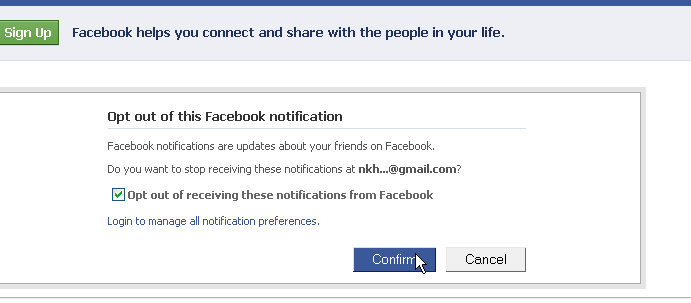
  • A new tab will open or asking confirmation. Check Opt Out and click Confirm.
    fb-email
  • You will get an unsubscription message.
    fb-optout
  • That's it, you won't receive any more emails from facebook.

How to Remove / Disable Facebook Advertisement


Facebook is the most popular and used social networking site in the world with over 1 billion users. Almost everyone has a Facebook account and some users just don’t like Facebook sponsor ads to show on their profile sidebar due to some spammy ads or reason(s) best known to them, though Facebook use this means to make money.


Today, I want to share how to remove ads from Facebook by using a lightweight userscript on your browser. After the installation of this script, the sidebar advertisement will be removed. Check the screenshot below to get a full understanding of how the script works before and after installation:


Steps to Remove Annoying Facebook Ads

==> You need to have Firefox or Google Chrome web browser on your computer. Both browsers are the quickest and best in the world.

==> To get rid of Facebook annoying ads, you have to install Adblock plus on your browser. After installation your Facebook ads will disappear as seen in the screenshot above. Download Adblock Plus for Chrome Hereand Adblock Plus for Firefox Here.

Find 'Who Unfriends You on Facebook'

You might have seen several fake/spam messages which promises you to identify the person who unfriends you on facebook. But almost 99% of them takes the publishing rights to your facebook wall and keep spreading spam messages on you wall.
But this time, I'm introducing a new web application which will help you to know, Who unfriends you on facebook. It works 100%

Follow these steps below to know who unfriends you on facebook.

  • Go to Site Click And Skip To Go site
  • Tick on terms of use and click 'login with facebook'
    out-and-in-info
  • The website will ask you for some permissions, Click on allow.
  • That's it.
After that, Whenever you visits inandout.info you will get notified on who had unfriended you.
How Outandin Works?
When you sign up to outandin.info, they will collect your friend list. And whenever you revisits, they will again check your friend list. And that's how they makes a calculation on who has unfriended you.
Will This App Stay Forever?
By looking into the history of facebook, We can understand that facebook never supported these kind of apps. So that, I can't guarantee you how long it will last.

New Facebook Chat Code Tricks


          Facebook has recently made changes to its chat features. Now we can use profile images in chat. You can even type anything in colour using a simple trick. You just need to know how to get facebook profile idwhich you will learn by reading this article Trick to find facebook profile id. Below are codes of A-Z and guide on how to use them in chat.


       1. How to use facebook profile images in chat ?
  • To use profile images in chat Enter this ==> [[username]]
  • In place of username enter username of person whose image you want to show in chat. 
  • If u will enter c00lhacks this will show image of my page. 

       2. Codes of A-Z for Facebook chat.

  • Below are codes of A-Z which you can use in facebook chat. You can create your on words with this codes. I will demonstrate how to do that .
[[107015582669715]]  = A
[[116067591741123]]  = B
[[115602405121532]]  = C
[[112542438763744]]  = D
[[115430438474268]]  = E
[[109225112442557]]  = F
[[111532845537326]]  = G
[[111356865552629]]  = H
[[109294689102123]]  = I
[[126362660720793]]  = J
[[116651741681944]]  = K
[[115807951764667]]  = L
[[106596672714242]]  = M
[[108634132504932]]  = N
[[116564658357124]]  = O
[[111669128857397]]  = P
[[107061805996548]]  = Q
[[106699962703083]]  = R
[[115927268419031]]  = S
[[112669162092780]]  = T
[[108983579135532]]  = U
[[107023745999320]]  = V
[[106678406038354]]  = W
[[116740548336581]]  = X
[[112416755444217]]  = Y
[[165724910215]]        = Z
       
      3. How to use this codes ?
  • First think wat word you want to create then pick up codes of that alphabate from above codes
  • Let us create hi . So pick up codes of H and I .
  • After that enter this in chat box  [[111356865552629]]  [[109294689102123]] 
  • Make sure there is space in between any two codes or else it will not work.
     
      4. Some Cool Facebook tricks.
  • Below are two codes to show Happy New year you can use any one of them
[[124641767652266]] [[124642810985495]] [[124643044318805]] [[124643044318805]] [[124643487652094]] [[124642300985546]] [[124644090985367]] [[124644404318669]] [[124644567651986]] [[124642300985546]] [[124643487652094]] [[124644404318669]] [[124642810985495]] [[124645367651906]] [[124642300985546]] [[124645977651845]] [[124646247651818]] [[124646574318452]] [[124645977651845]] [[124642300985546]]

OR

[[337992182896839]] [[225777904163650]] [[244015585667152]] [[244015585667152]] [[319152701438185]] [[188142511282558]] [[319977728035866]] [[316759491692170]] [[139287272851910]] [[188142511282558]] [[319152701438185]] [[316759491692170]] [[225777904163650]] [[337598512918963]] [[188142511282558]] [[141281852650929]] [[268263169900550]] [[191790684249921]] [[141281852650929]]

  • Enter below codes to show Cool Hacking Tricks
[[115602405121532]] [[116564658357124]] [[116564658357124]] [[115807951764667]]    [[111356865552629]] [[107015582669715]] [[115602405121532]] [[116651741681944]] [[109294689102123]] [[108634132504932]] [[111532845537326]]     [[112669162092780]] [[106699962703083]] [[109294689102123]] [[115602405121532]] [[116651741681944]] [[115927268419031]]

Monday, February 18, 2013

Trick to find facebook Profile ID


               In my previous post i have posted about Facebook status update trick in which we use profile id, but what if  person got username. So this is the trick which will let you get profile id of any person who got custom username. Check below image and see how URL of  facebook profile looks before and after custom username.


                  In case of Profile ID before custom username you can easily identify it by looking at Profile URL, But in case of profile with custom username its not same. Below are simple steps to find Profile ID having custom username.
  • Go to the profile you want to find Profile ID
  • That URL will look like this www.facebook.com/username
  • Change that URL to graph.facebook.com/username
  • Then you will get something like below image.

How To Increase Facebook Fan Page Likes


facebook-like-button
Facebook is used to drive traffic to your blog/website and the Facebook fan page plays key role to improve your new website/blog’s traffic. New blog/website’s main traffic source is social media and then Google takes the place of main source of the traffic.

Why you should increase your Facebook Fan Page likes ?

There are many advantages of getting more Facebook fan page likes, like you will get the huge amount of the traffic in your new blog and your revenue will increase. 
More traffic + more ad visibility = More revenue. You can add AdSense in to your blog/website to monetize your traffic.
Article you might like:

Add Facebook Fan Page like box in to your Website/blog

You need to add the Facebook fan page like box to increase your Facebook page likes. Now a days people want quality articles and tips so if you are generating quality articles then they might like your page to get more quality tips and articles. 
Add Facebook Pan Page like box in to your blog/website.

Other Ways to Increase Facebook Fan Page likes.

There are many other ways to increase Facebook Fan Page Likes like invite your friends and post some pictures and tag your friend And tell them to share that pictures ! And yes there is one script which helps you to increase your Facebook Fan Page likes but never use that kind of the scripts. Post your Facebook Fan Page Links in to the Facebook Groups and surely you will get more and more Facebook Fan Page likes !